EditorGUI.TextField
public static string TextField(Rect position,
string text,
GUIStyle style = EditorStyles.textField);
public static string TextField(Rect position,
string label,
string text,
GUIStyle style = EditorStyles.textField);
public static string TextField(Rect position,
GUIContent label,
string text,
GUIStyle style = EditorStyles.textField);
Parameters
| position | Rectangle on the screen to use for the text field. | |
| label | Optional label to display in front of the text field. | |
| text | The text to edit. | |
| style | Optional GUIStyle. |
Returns
string The text entered by the user.
Description 描述
Makes a text field.
This works just like GUI.TextField, but correctly responds to select all, copy, paste etc. in the editor,
and it can have an optional label in front.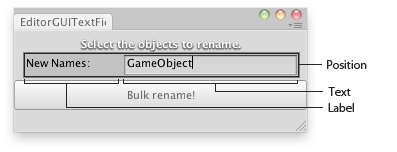
Text field in an Editor Window.
using UnityEngine;
using UnityEditor;

// Changes the name of the selected Objects to the one typed in the text field

class EditorGUITextField : EditorWindow
{
    string objNames = "";

    [MenuItem("Examples/Bulk Name change")]
    static void Init()
    {
        var window = GetWindow<EditorGUITextField>();
        window.Show();
    }

    void OnGUI()
    {
        EditorGUI.DropShadowLabel(new Rect(0, 0, position.width, 20),
            "Select the objects to rename.");

        objNames = EditorGUI.TextField(new Rect(10, 25, position.width - 20, 20),
            "New Names:",
            objNames);

        if (Selection.activeTransform)
        {
            if (GUI.Button(new Rect(0, 50, position.width, 30), "Bulk rename!"))
            {
                foreach (Transform t in Selection.transforms)
                {
                    t.name = objNames;
                }
            }
        }
    }

    void OnInspectorUpdate()
    {
        Repaint();
    }
}