EditorGUILayout.LayerField
public static int LayerField(int layer,
params GUILayoutOption[] options);
public static int LayerField(string label,
int layer,
params GUILayoutOption[] options);
public static int LayerField(string label,
int layer,
GUIStyle style,
params GUILayoutOption[] options);
public static int LayerField(GUIContent label,
int layer,
GUIStyle style,
params GUILayoutOption[] options);
Parameters
| label | Optional label in front of the field. | |
| layer | The layer shown in the field. | |
| style | Optional GUIStyle. | |
| options | An optional list of layout options that specify extra layout properties. Any values passed in here will override settings defined by the style.See Also: GUILayout.Width, GUILayout.Height, GUILayout.MinWidth, GUILayout.MaxWidth, GUILayout.MinHeight, GUILayout.MaxHeight, GUILayout.ExpandWidth, GUILayout.ExpandHeight. |
Returns
int The layer selected by the user.
Description 描述
Make a layer selection field.
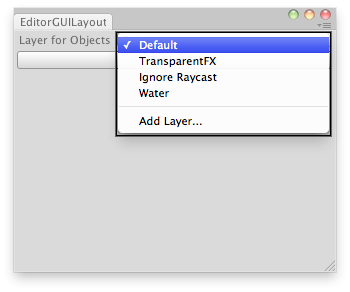
Set the layer of the selected GameObjects.
// Simple editor script that lets you set the layer for the
// selected GameObjects.

using UnityEngine;
using UnityEditor;

public class LayerFieldExample : EditorWindow
{
    static int selectedLayer = 0;

    [MenuItem("Examples/Layer Field usage")]
    static void Init()
    {
        LayerFieldExample window = (LayerFieldExample)GetWindow(typeof(LayerFieldExample));
        window.Show();
    }

    // Disable menu if we dont have at least 1 gameobject selected
    [MenuItem("Examples/Layer Field usage", true)]
    static bool ValidateSelection()
    {
        return Selection.activeGameObject != null;
    }

    void OnGUI()
    {
        selectedLayer = EditorGUILayout.LayerField("Layer for Objects:", selectedLayer);
        if (GUILayout.Button("Set Layer!"))
            SetLayer();
    }

    static void SetLayer()
    {
        foreach (var go in Selection.gameObjects)
            go.layer = selectedLayer;
    }
}