GUILayout.BeginHorizontal
public static void BeginHorizontal(params GUILayoutOption[] options);
public static void BeginHorizontal(Texture image,
GUIStyle style,
params GUILayoutOption[] options);
public static void BeginHorizontal(GUIContent content,
GUIStyle style,
params GUILayoutOption[] options);
Parameters
| text | Text to display on group. | |
| image | Texture to display on group. | |
| content | Text, image, and tooltip for this group. | |
| style | The style to use for background image and padding values. If left out, the background is transparent. | |
| options | An optional list of layout options that specify extra layouting properties. Any values passed in here will override settings defined by the style.See Also: GUILayout.Width, GUILayout.Height, GUILayout.MinWidth, GUILayout.MaxWidth, GUILayout.MinHeight, GUILayout.MaxHeight, GUILayout.ExpandWidth, GUILayout.ExpandHeight. |
Description 描述
Begin a Horizontal control group.
All controls rendered inside this element will be placed horizontally next to each other. The group must be closed with a call to EndHorizontal.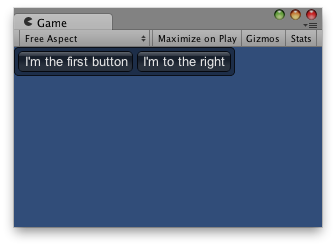
Horizontal Layout.
using UnityEngine;

public class ExampleScript : MonoBehaviour
{
    void OnGUI()
    {
        // Starts a horizontal group
        GUILayout.BeginHorizontal("box");

        GUILayout.Button("I'm the first button");
        GUILayout.Button("I'm to the right");

        GUILayout.EndHorizontal();
    }
}